Best Tools for Content Research in 2026
Search "content research tool" and you'll get a hundred listicles that all recommend the same eight products and never explain which one you actually need. The problem isn't a shortage of tools — it's that "content research" means at least three different jobs, and a tool built for one is often useless for another. A keyword-gap platform will tell you what to rank for; it won't tell you whether your specific draft has already been written. A discovery engine will tell you what's going viral; it won't build you an outline.
So this roundup is organized around the job, not the brand. Figure out which of the three jobs below you're doing, and the right tool falls out of it. We include BeingSaid here too — it's our tool, and we've tried to place it honestly next to the alternatives rather than at the top of every category. For most of these jobs, it isn't the answer, and we'll say so.
First, which job are you actually doing?
Three distinct jobs hide under the phrase "content research":
Keyword and SEO gap — "What should I write to get traffic?" You want the search terms competitors rank for that you don't, sorted by volume and difficulty. This is the SEO-strategist job.
Content discovery and trends — "What's already performing on this topic?" You want the most-shared, most-linked, most-engaged pieces so you can see what resonates and who's driving the conversation.
Draft-first, "has this been said" checking — "I already have a draft or an idea. What's out there on the specific ground this piece covers?" You're not starting from a keyword; you're starting from your own writing, and you want the related reading, the prior art, and the angle nobody's taken.
Most tools are excellent at one of these and mediocre at the other two. Buy for the job you do most.
The keyword and SEO-gap tools
Ahrefs
Ahrefs' Content Gap tool (under Site Explorer) takes up to ten competitor domains and returns the keywords they collectively rank for that you don't — powered by one of the largest keyword and backlink databases available. If your research question is "what topics are my competitors winning that I'm missing," this is close to the category standard. It's a heavyweight SEO suite with pricing to match, so it's overkill if you're a solo writer who just wants to check a single draft. Best for teams running an ongoing SEO program.
Semrush
Semrush's Keyword Gap feature compares up to five domains at once and buckets the results with "Missing," "Weak," and "Untapped" filters that make prioritization fast. Functionally it overlaps heavily with Ahrefs; the choice between them usually comes down to which interface and which surrounding suite (rank tracking, audits, PR tools) you prefer. Like Ahrefs, it's priced for professionals and businesses, not casual use.
Surfer SEO
Surfer is less about finding the topic and more about optimizing once you have it. Its Content Editor analyzes the top-ranking pages for your target keyword and generates a score-based checklist — ideal length, terms to include, heading structure. It's a writing-and-optimization companion rather than a discovery tool, so it slots in after you've decided what to write.
The discovery and trend tools
BuzzSumo
BuzzSumo is the veteran of content discovery. Enter a topic, keyword, or domain and it returns the most-shared and most-engaged articles across the web and social platforms, plus a Question Analyzer for "People Also Ask" targeting, a YouTube analyzer, and influencer search. If your question is "what's already resonating on this topic and who's driving it," this is the strongest pick. What it won't do is read your draft and find the pieces most like it — it works from a topic you type, not text you paste.
AnswerThePublic
A narrow, useful tool: feed it a seed keyword and it maps the questions and phrases real people search around it. Great for finding the sub-questions your piece should answer and for headline angles. It's a supplement to a bigger workflow, not a standalone research stack.
The brief-builders and topic modelers
Frase
Frase sits between research and drafting. Enter a keyword and it pulls competitor headings, related questions, and topic clusters into a content brief — faster and more detailed than what you'd assemble by hand from Ahrefs or Semrush. It's the pick if your bottleneck is turning research into an outline you can hand to a writer.
MarketMuse
MarketMuse leans on topic modeling to score how thoroughly you've covered a subject and to surface semantically related subtopics you've missed. It's aimed at teams building topical authority at scale, and the price and learning curve reflect that.
The draft-first tool
BeingSaid
This is the job the tools above mostly don't do. Every one of them starts from a keyword or a competitor domain you supply. BeingSaid starts from your actual writing: you paste a draft, an outline, or a messy notes file, and it reads the piece to pull out the 3–7 core ideas it's genuinely about — including the ones you were too close to your own draft to name. It searches each idea independently, then ranks the articles by how many of your ideas surfaced them. The pieces that show up across several of your concepts are the ones sitting at the same intersection your draft does — which is the strongest "this covers your ground" signal there is, and exactly the overlap that's nearly impossible to catch by hand. (We wrote a whole guide on why that crossover matters: how to find out what's already been written about your topic.)
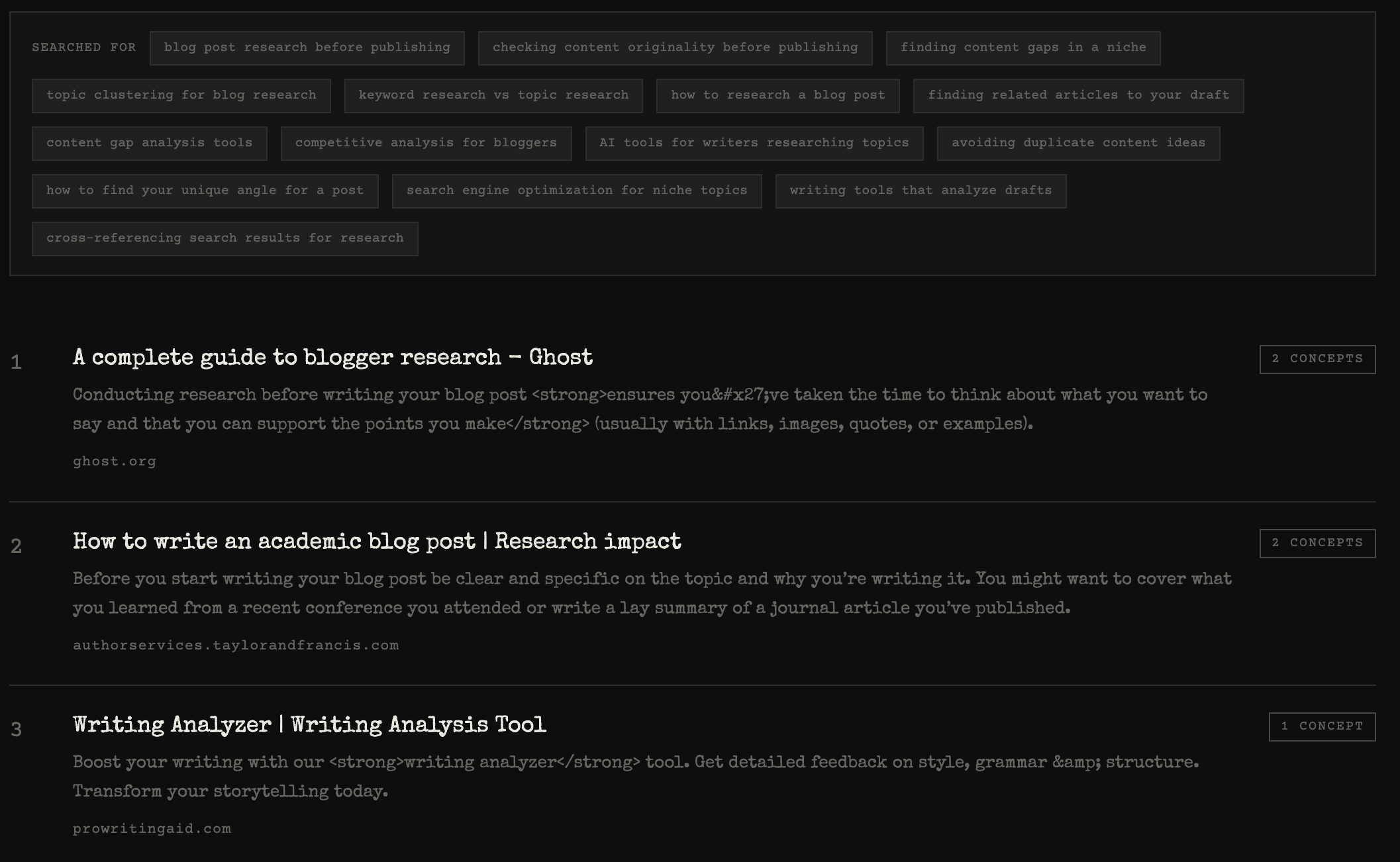
Where it fits: the "has this been said before," related-reading, and originality-check job — a draft in hand, wanting to see the surrounding conversation before publishing. Where it doesn't: it's not a keyword-volume tool, it won't build you a competitor keyword matrix, and it won't tell you what's trending on social. If your job is SEO strategy or trend-spotting, use one of the tools above. If your job starts from your own text, it's built for exactly that. The free tier is 5 searches, no card, so it's cheap to find out which camp you're in.
The free baseline: don't skip it
Before any subscription, plain Google search plus a notes file still does the core job — search each idea in your piece, skim the results, and track which articles keep resurfacing across searches. It's slow and the tracking step is exactly where human attention fails, but it's free and it's often enough for a one-off. The paid tools earn their keep when you're doing this weekly, at volume, or need data (search volume, share counts, backlink numbers) that manual searching can't give you.
Quick comparison
| Tool | Primary job | Starts from | Best for |
|---|---|---|---|
| Ahrefs | Keyword / content gap | Competitor domains | Ongoing SEO programs |
| Semrush | Keyword gap | Competitor domains | SEO + broader marketing suite |
| Surfer SEO | On-page optimization | A chosen keyword | Optimizing a draft you've committed to |
| BuzzSumo | Discovery / trends | A topic or keyword | Seeing what's resonating + who drives it |
| AnswerThePublic | Question research | A seed keyword | Finding sub-questions and angles |
| Frase | Brief building | A keyword | Turning research into an outline fast |
| MarketMuse | Topic coverage | A topic | Building topical authority at scale |
| BeingSaid | "Has this been said" / related reading | Your own draft | Checking the conversation before you publish |
| Google + notes | All of the above, slowly | Whatever you type | One-off, zero-budget research |
How to choose in one line
If you're planning an SEO calendar, start with Ahrefs or Semrush. If you want to know what's already resonating, use BuzzSumo. If you need an outline fast, Frase. If you're optimizing a piece you've already committed to, Surfer. And if you already have a draft and want to see what's been said on the exact ground it covers, that's the job BeingSaid was built for.
Most serious writers end up using two: one for the keyword-and-trends side, and one for the draft-first side. They answer different questions, and neither substitutes for the other.
Have a draft you're about to publish? See what's already been said on it before you hit go. Every new account gets 5 free searches — no card required, just sign in with Google. Paste your text and see what's being said →